

How to Use the Spire Solver
In the Spire of Eternity, some encounters are won by negotiation instead of battle: five spirits each want a resource, and you have three rounds to find out which. Guessing wastes rounds and goods. The Spire Solver works out the offer with the best chance to win, tells you when to use a Spectral Stone, and shows your chance to win before every round.
Play it right in the game
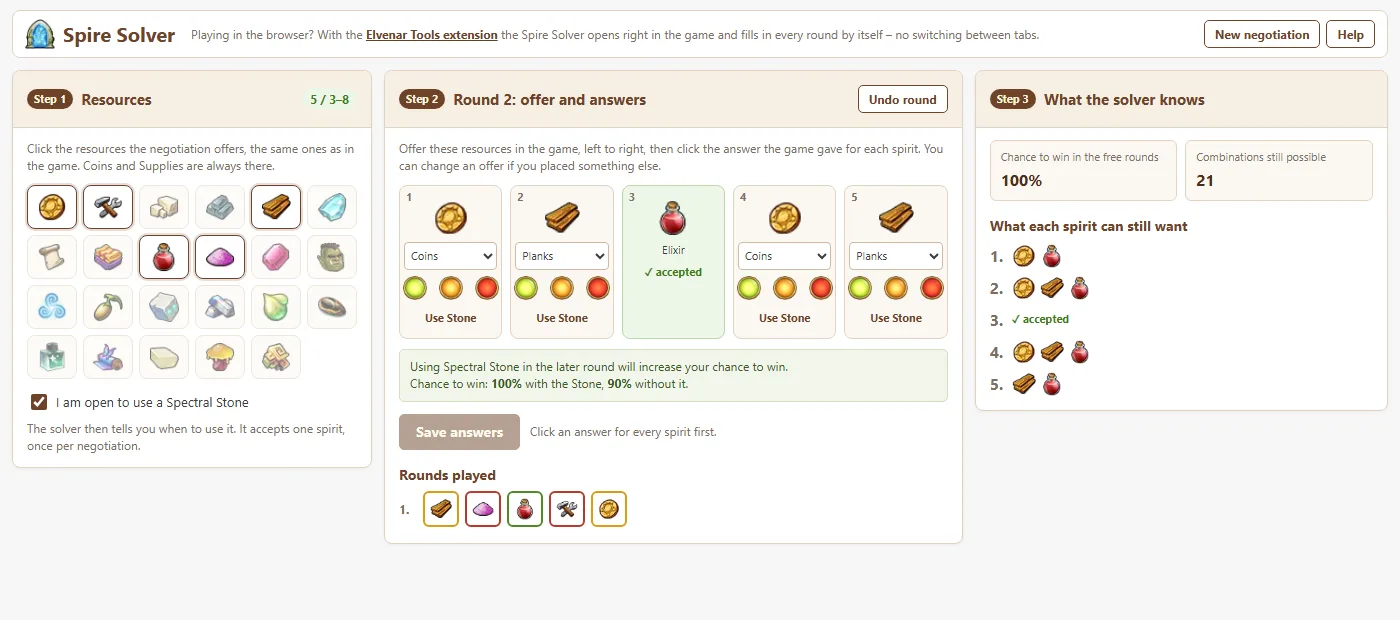
If you play Elvenar in the browser, install the Elvenar Tools Extension. Open its menu in the game and click Spire Solver: a small window opens next to the negotiation and stays there while you play. It reads the offered resources and every answer from the game, so it shows the next suggestion as soon as you submit a round. It never places anything for you.
Using this page instead
The steps below are only for this page, if you play on mobile or prefer not to use the extension. With the extension you can skip them, since it fills everything in by itself.
Step 1: Resources
Click the resources the negotiation offers, the same ones you see in the game. Coins and Supplies are always part of it; a negotiation offers three to eight resources. Tick I am open to use a Spectral Stone if you own one and want the solver to plan with it.
Step 2: Offer and answers
The solver fills in what to offer each spirit, from left to right as in the game. Place those resources in the game and submit. Then click the bubble with the answer the game gave for each spirit: green for the green check, yellow for Wrong person and red for Nobody needs it (hover over a bubble to see its name), and press Save answers. If you offered something else, change the resource first. When the solver suggests the Spectral Stone, use it on the spirit it shows. Sometimes the best offer counts on using the Stone in the next round; a note then tells you in which round. If you would rather keep the Stone for a later encounter, the note below shows the best offer without it and your chance to win then; click Use these offers to take it instead. The extension window shows the same choice under Without the Stone
Step 3: What the solver knows
The solver shows your chance to win in the free rounds, how many combinations are still possible and which resources each spirit can still want. Satisfied spirits are marked as accepted. When all five are satisfied, press New negotiation for the next encounter.
Frequently Asked Questions
How does a Spire negotiation work?
Five spirits each want one of the resources the negotiation offers; several of them may want the same one. Every round you offer one resource to each spirit. A green check means that spirit wants it, Wrong person means another spirit who is not satisfied yet wants it, and Nobody needs it means no other spirit wants it. You have three free rounds to satisfy all five.
How does the Spire Solver choose what to offer?
It keeps every combination of wanted resources that agrees with the answers so far, counting them all as equally likely. Then it tries every possible offer, and every way to use a Spectral Stone, and picks the one that gives the best chance to satisfy everyone within the free rounds left.
Why does the first round not show a chance to win?
The first round always offers five different resources (or repeats some when only three or four are offered), because that tells the most about what the spirits want. From the second round on, the solver shows the exact chance of winning in the free rounds that are left.
When should I use a Spectral Stone?
A Spectral Stone accepts one spirit, once per negotiation, whatever they wanted. Tick I am open to use a Spectral Stone and the solver tells you in which round and on which spirit using it raises your chance the most. If you have no Stone or want to keep it for a later encounter, the solver also shows the best offer without it and how much lower your chance to win is then.
Can the solver play the negotiation for me?
No. It only suggests what to offer. You place the resources in the game yourself. The Elvenar Tools extension reads the game's answers so you do not have to enter them, but it never clicks anything in the game.
The solver says no combination fits the answers. What now?
One of the answers was entered wrongly. Use Undo round and click the colours again exactly as the game showed them. With the extension this cannot happen, because it reads the answers straight from the game.