


How to Use the Inventory Manager
Over time, your Elvenar inventory fills up with event buildings, evolving buildings and rewards that are hard to compare in the game. The Inventory Manager shows all of them in one sortable table. You can quickly find the building that gives you the most Culture, Population or goods per tile and decide what is worth placing in your city and what should stay in storage.
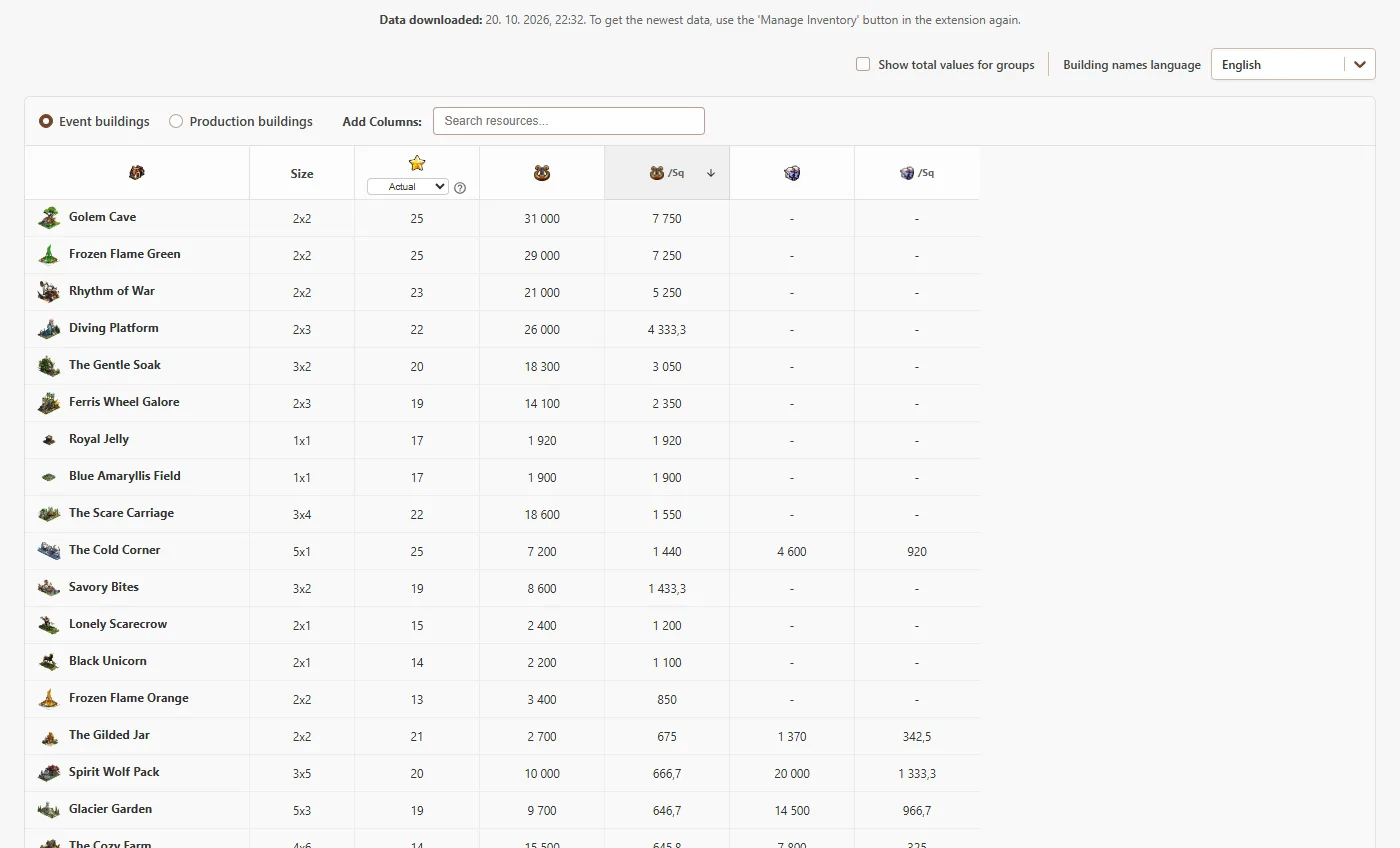
1. Send your inventory from the game
- Install the Elvenar Tools Extension for Chrome or Firefox.
- Open Elvenar in your browser and wait until the game has fully loaded.
- Open the extension menu in the top-left corner of the game and click Manage Inventory.
- This page opens with your inventory, and your player name, fellowship and world are shown at the top.
2. Choose what to compare
Switch between Event buildings and Production buildings at the top of the table. Culture and Population are always visible. Use Add Columns to add any other resource your buildings produce. Every resource has two columns: the total value of one building and the value divided by its size, which is the number you usually care about when space is limited.
3. Sort and group
Click any column header to sort by it, and click again to reverse the order. Identical buildings are grouped into one row with their count in brackets. Turn on Show total values for groups to see the combined output of all copies instead of a single building. You can also show building names in any language supported by the game.
4. Plan for future chapters
The level column has a chapter selector. Choose a chapter and every building is recalculated as if it were upgraded to that level, so you can see which buildings will be the strongest after your next research. For event buildings, the table also shows how many Royal Restorations each upgrade needs, which helps you decide where to spend them.
Frequently Asked Questions
Why does the Inventory Manager say it is waiting for inventory data?
The game does not let websites read your inventory, so the data has to come from the Elvenar Tools Extension. Open Elvenar with the extension installed, click Manage Inventory in the extension menu and the table fills automatically.
Is my inventory data uploaded anywhere?
No. The inventory is sent from the game tab to this page and stored only in your browser's local storage, so it is still there the next time you open the Inventory Manager.
How do I refresh the data after I collect new buildings?
Click Manage Inventory in the extension again. The page shows when the data was last downloaded, so you can always tell whether it is up to date.
What do the /sq and /sq/hr columns mean?
They divide the value of a building by the number of tiles it occupies. Culture and Population are shown per square, and production resources per square per hour. This lets you compare buildings of different sizes fairly.
How are Royal Restorations calculated?
When you preview event buildings at a higher chapter, each upgraded building shows how many Royal Restorations it needs to reach that level. Upgrading a building by one level costs one Royal Restoration per tile it occupies.