




How to Use the Cauldron Calculator
Once a week the Witch's Cauldron in the Magic Academy lets you brew a potion that can trigger powerful effects, from stronger units in the tournaments to more goods or Coins. Which effect you get depends on the ingredients you put in, and finding a good mix in the game is mostly guesswork. The Cauldron Calculator works out the best recipe for the effects you want, the Witch Points you have and this week's premium ingredients, and shows the exact chance of every effect before you brew.
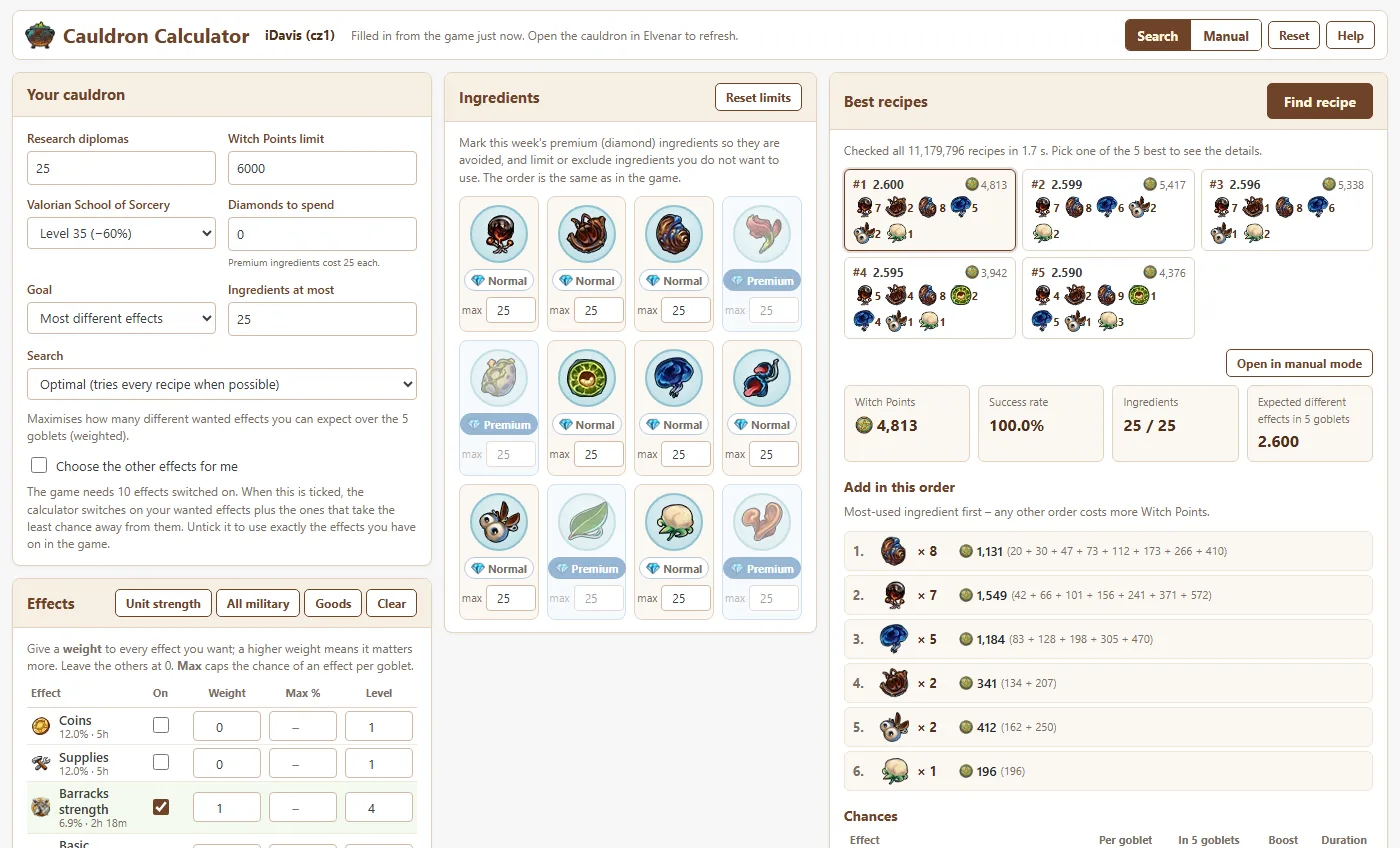
1. Fill in your cauldron
With the Elvenar Tools Extension this happens by itself: open the cauldron in the Magic Academy and the calculator takes over your research diplomas, Witch Points, the level of the Valorian School of Sorcery, this week's premium ingredients, the effects you have switched on and their levels. If the calculator is not open yet, click Cauldron Calculator in the extension menu to open it already filled in. Each city keeps its own settings. Without the extension, enter the numbers yourself:
- Research diplomas – how many effects you have unlocked in the research tree.
- Witch Points limit – the most the recipe may cost. Leave it empty for no limit.
- Valorian School of Sorcery – the level of the Ancient Wonder that makes ingredients cheaper.
- Premium ingredients – click Normal on the four ingredients that cost diamonds this week to mark them as premium.
2. Choose the effects you want
Give every effect you want a weight. A weight of 1 is normal, higher weights matter more. The presets fill in common choices such as unit strength for tournaments. You can also set the highest chance an effect may get, and the effect levels, which change the boost and duration shown in the results.
The game needs 10 effects switched on. By default the calculator uses exactly the effects ticked in the On column, which the extension fills in from your game. Tick Choose the other effects for me to let the calculator pick the remaining ones instead, so they take as little chance as possible away from the effects you want; the result then tells you which effects to switch on.
3. Pick a goal and find the recipe
Choose what "best" means: the best weighted chance per goblet, the most different wanted effects in your 5 goblets, or the best chance of getting at least k or all of them. Press Find recipe. The five best recipes appear; click one to see:
- the ingredients in the order to add them, with the Witch Points of every unit,
- the success rate and the chance of each effect per goblet and in all 5 goblets,
- the boost and duration of each effect at your levels,
- which effects to switch on in the cauldron's Upgrade Effects screen.
4. Try recipes by hand
Switch to Manual mode to build a recipe like in the game. Each ingredient shows the price of the next unit, just like the tags in the game, and the chances update as you click. Open in manual mode on any result lets you start from it and adjust it.
Frequently Asked Questions
How does the Witch's Cauldron decide which effect I get?
Every ingredient adds to a value or to a factor of each potion effect. An effect's weight is its value multiplied by 1.1 to the power of its factor, and effects with a value of 0 or less get no weight at all. The chance of an effect is the success rate multiplied by its share of the total weight of all switched-on effects. The calculator uses exactly these rules, so the chances it shows are the chances you see in the game.
How is the success rate calculated?
The success rate is the square root of the number of ingredients divided by 25. With 25 ingredients it is 100%, with 15 ingredients 77.5% and with 2 ingredients 28.3%.
Why does the order of the ingredients matter?
Each ingredient costs more the more ingredients are already in the cauldron, and even more the more of the same ingredient is already in. Adding the most-used ingredient first is the cheapest order. The calculator lists the ingredients in that order with the Witch Points of every single unit, so following it costs exactly what it shows.
Does the Valorian School of Sorcery count?
Yes. Choose its level and the discount is applied to every ingredient the way the game does it: the price is rounded first, then the discount is applied and the result rounded down.
What about premium ingredients?
Four ingredients cost diamonds each week. Mark them as premium and the calculator avoids them. If you want to spend diamonds, enter how many: each premium ingredient costs 25 diamonds, counts towards the 25 ingredients and the success rate, and does not make the other ingredients more expensive.
The game wants 10 effects switched on, but I only want two or three. What do I do?
Tick "Choose the other effects for me". The calculator then switches on your wanted effects plus the effects that take the least chance away from them, ideally effects that get no chance at all with the recipe. The result lists exactly which effects to switch on in the cauldron's Upgrade Effects screen.
What are goblets and what do the goals mean?
A brew gives 5 goblets and each goblet is an independent roll with the same chances. Best weighted chance maximises the chance per goblet, weighted by how much you want each effect. Most different effects maximises how many different wanted effects you can expect in the 5 goblets. At least k and All maximise the chance of getting at least k, or all, of your wanted effects.
Is the result really the best recipe?
In Optimal mode the calculator checks every possible recipe that fits your limits, which takes a few seconds in your browser. When so many ingredients are allowed that this would take too long, for example when spending diamonds, it switches to a fast smart search that finds the best recipe or one very close to it.